
When adding labor to a ticket, you have the option to select which truck a driver used on the job. It is not required but it is useful information.
Trucks are actually a subset of Equipment and has all the same information available to track. Once trucks are setup they can be assigned to specific drivers as their 'default' truck which will get added to the tickets automatically.
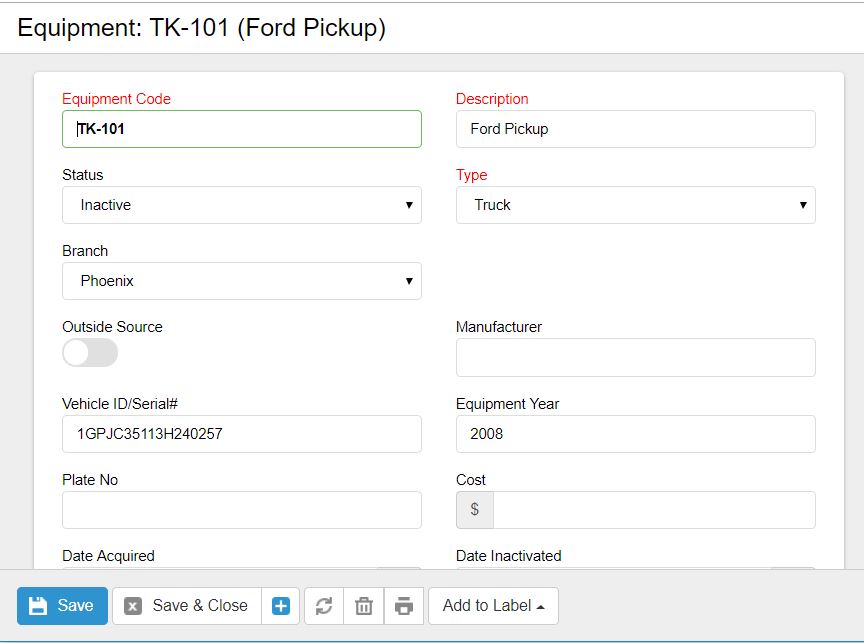
Equipment Code: This should represent the individual (and unique) truck number that you have assigned to the vehicle. This number is what is entered on the ticket labor screen.
Description: The description is what will appear on a the ticket labor when selecting a truck, as well as on a variety of reports.
Status: As trucks are sold or taken out of service you should change the status to Inactive so it is no longer selected.
Type: This must be set to Truck because only equipment type Truck is pulled into the list on the ticket labor screen as well as the driver record for a default truck.
Branch: Just like equipment, if you assign a Branch, it will limit what trucks are available for a ticket based on the branch associated with the job.
0 Comments